The top panel of your dashboard shows how much you are owed and lists the invoices and quotes you should act on next. This article explains what appears in each list and how items leave it.
Outstanding invoices
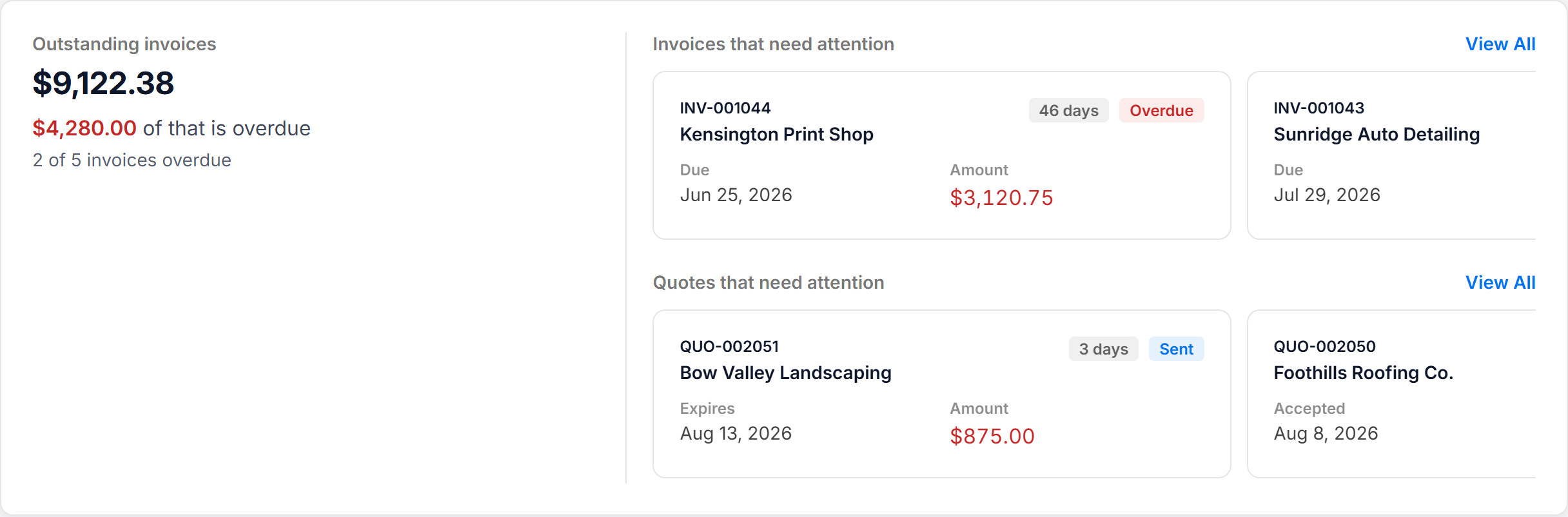
The left side of the panel shows Outstanding invoices: the remaining balance on every invoice you have sent that is not yet fully paid. Below it, you see how much of that amount is overdue and how many invoices are overdue, or Nothing overdue right now.
For more on how these amounts differ, see Outstanding vs. overdue: What's the difference?.
Invoices that need attention
The Invoices that need attention list shows these items, in this order:
- Overdue invoices: invoices with a status of Sent or Viewed whose due date has passed. Each card shows the invoice number, customer, due date, amount and how many days late it is. The longest-overdue invoices appear first.
- A recently viewed invoice: your most recent invoice that the customer has opened but not paid, and that is not yet overdue. It shows "Opened by the customer — not paid yet."
- Draft invoices: invoices you started but have not sent, newest first. Each shows "Draft — finish and send it." Drafts you have scheduled to send are not included.
Each group shows up to three cards. If there are more, a summary card shows the number and total amount, such as "4 more overdue invoices", with a View all link to the matching invoices.
If nothing needs your attention, the list shows "No invoices need your attention right now."
Quotes that need attention
The Quotes that need attention list shows these items, in this order:
- Expiring soon: sent or viewed quotes that expire within the next 7 days. Each card shows how many days are left, or Today.
- Expired: quotes that expired in the last 30 days.
- Rejected: quotes your customer rejected in the last 30 days.
- Accepted: accepted quotes that have not yet been converted to an invoice.
- A recently viewed quote: your most recent quote that the customer has opened but not responded to.
- Draft quotes: quotes you started but have not sent.
Like invoices, each group shows up to three cards, followed by a summary card with a View all link when there are more.
Clearing items from the lists
Items leave the lists when their status changes. You do not dismiss them by hand.
- Overdue invoice: record the payment, or void the invoice if you no longer expect to collect it.
- Draft invoice or quote: finish and send it, or delete it if you do not need it.
- Accepted quote: convert it to an invoice.
- Expired or rejected quote: it drops off automatically 30 days after it expired or was rejected.
Click any card to open the invoice or quote. To see everything, click View All beside either list heading.